Intralinks Data Room Overview

About Intralinks
Intralinks VDR Pro is a virtual data room provider and technology partner for global banking and dealmaking. As part of SS&C Technologies, the platform delivers data-sharing solutions and services used across financial services, legal, real estate, life sciences, energy, technology, and consumer retail.
With 115 offices in 35 countries and a 35-year history as an industry-leading technology, Intralinks supports secure, future-ready information sharing in regulated environments, operating at a global scale, including Canada. Examples of Canadian organizations using the platform include TD Cowen, RockPort Capital, and DSM.
In this overview, we explore:
- Intralinks VDRPro use cases
- Key software features
- Deployment, integration, and support capabilities
- Insights into service costs
- Intralinks pros and cons based on recent user feedback
- How Intralinks compares with other top providers
Who Intralinks virtual data room is built for
Dealmakers across industries use the software in the following scenarios:
- Mergers and acquisitions. Intralinks helps deal teams organize documents, track user access, and manage transaction steps.
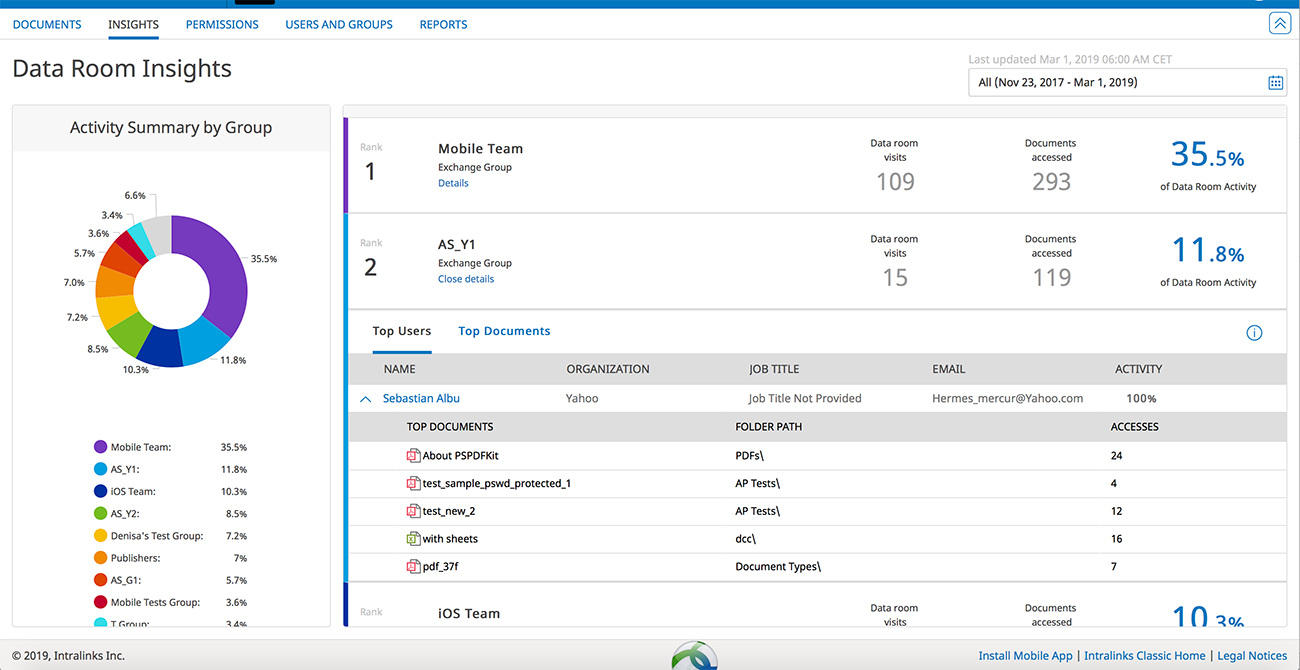
- Initial public offerings. The platform protects sensitive documents, manages disclosures, and maintains visibility over data and users throughout the process.
- Fund management. Intralinks assists general partners in capital raising, delivering real-time insights into investor communications and organizing fund documentation.
- Financing. The platform enables secure collaboration and document sharing for banking and capital markets professionals across complex financing transactions.
- Syndicated lending. Intralinks uses centralized tools and automation to manage the full loan life cycle, reducing dependence on manual processes and multiple platforms.
- Secure document exchange. The platform ensures safe data sharing across firewalls, networks, VPNs, and geographical boundaries.
- Compliance. Intralinks facilitates regulatory reporting and provides controlled access for secure collaboration among stakeholders.
The variety of use cases shows how Intralinks secure collaboration platform accommodates different transaction workflows and document management needs across multiple sectors. This highlights the platform’s flexibility in supporting teams with varying deal requirements.
Key Intralinks data room features
The following table summarizes Intralinks solutions, grouped into core categories for security, permissions, collaboration, document management, and compliance.
| Security | |
| Advanced information rights management (IRM) | Confidential documents remain protected even after download, with controls for access and retrieval. |
| Encryption at rest and in transit | All data is encrypted using AES-256 while stored and during transmission. |
| Enhanced authentication | VDR access can require two-factor authentication or session-based one-time passwords for stronger data protection. |
| Watermarking for PDFs and Office Files | Dynamic watermarks can be applied to PDF and Office documents, with visibility controlled by user role or group. |
| AI-powered PII and document redaction | Sensitive information can be automatically identified and redacted. |
| Secure Viewer | Sensitive content can be accessed in a protected viewer without requiring a download. |
| Permissions and Access Controls | |
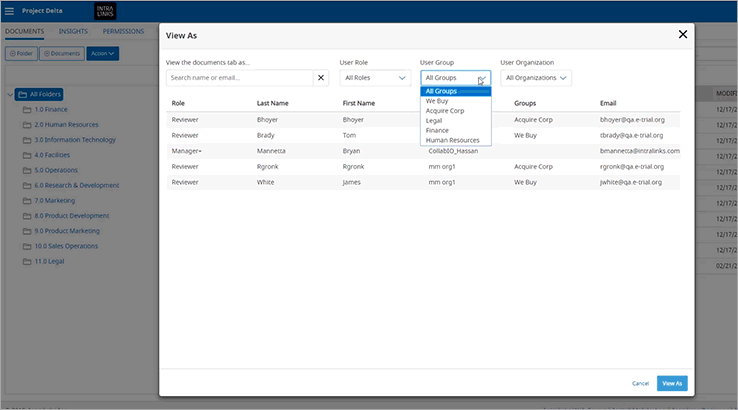
| Granular permission controls | Access rights can be set at the document, folder, and group level to ensure appropriate visibility. |
| Expanded group support | Permissions management supports up to 20 groups, with clear folder-level visibility. |
| iOS folder permission management | Folder permissions and additional privileges can be managed on iOS devices. |
| Collaboration Tools | |
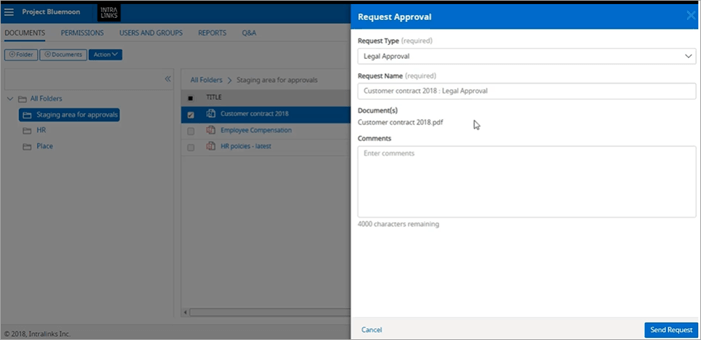
| Q&A functionality | The platform supports bulk question import and management, with priority and access controls. |
| Mobile app access | The VDRPro app provides secure document access and enables seamless collaboration from any location. |
| Notifications | System-generated alerts keep users informed about activity and changes. |
| Document Management | |
| Secure document exchange | Documents can be safely shared across networks, firewalls, and VPNs. |
| Excel Viewer | The functionality includes navigating multiple sheets, editing formulas, and making structural changes to rows, columns, and the overall file layout. |
| Document Analyzer | The analyzer identifies documents that require attention and allows filtering by issue type. |
| Compliance Controls | |
| Certifications & Standards | ISO 27001 ISO 27701 SOC 1 SOC 2 SOC 3 GDPR CCPA HIPAA FINRA SEC FDA 21 CFR Part 11 Intralinks maintains rigorous compliance with global standards and regulations to ensure the security, privacy, and integrity of sensitive data across industries. |
Key usage guidelines and limitations
To ensure optimal performance, Intralinks recommends following practices for VDR setup, document handling, user management, and bulk operations. While these limits can be exceeded, doing so may affect responsiveness and user experience.
VDR size and structure
- Total VDR size. Recommended up to 250 GB; larger VDRs may impact archives.
- Total folders. Recommended 10,000, with up to 200 top-level folders for best performance.
- Total documents. Recommended 50,000, with no more than 1,000 per folder.
Document limits
- File size. 25 GB for the US, Germany, and Australia; 15 GB elsewhere.
- Protected documents. IRM protection up to 150 MB for Office files, 500 MB for PDFs.
- PDF watermarking. Maximum 200 MB per file or 5,000 pages.
- Recommended total document size: 100 GB; exceeding may reduce performance.
User and group management
- Users per VDR. < 3,000 recommended.
- Users per group. < 2,500.
- Groups per VDR. Recommended 2,500.
Bulk operations
- Permissions. Bulk operations limited to 125,000 records; folder permissions limited to 100,000 records.
- Bulk import of questions. < 150.
- Bulk document upload. < 25 GB.
Limits are independent; staying under one limit does not allow exceeding another.
Intralinks vs other VDRs: Key differences
The comparison below outlines how the solution compares with other leading virtual data room providers. Explore how VDR providers perform across the core areas and check user ratings for each.
| Aspect | Intralinks | Ideals | Firmex | Ansarada |
|---|---|---|---|---|
| Primary focus | Large-scale transactions across highly regulated industries | M&A, legal, and corporate transactions across mid-market and enterprise deals | Corporate, legal, and financial transactions | Deal management with an emphasis on structured workflows and analytics |
| Granular access controls | 4 levels | 8 levels | 6 levels | 4 levels |
| User access expiration | ✖ | ✔ | ✖ | ✖ |
| Built-in redaction | ✔ | ✔ | ✔ * 21 file format support | ✔ |
| Transparent usage-based pricing | ✖ | ✔ | ✖ | ✔ |
| 24/7 in-app support | ✔ | ✔ | ✖ | ✔ |
| Security rating (out of 950) | n/a | 948 | 864 | 796 |
| Functionality rating (out of 5) | 4.3 | 4.6 | 4.6 | 4.5 |
| Customer service (out of 5) | 4.3 | 4.8 | 4.9 | 4.7 |
| Value for money (out of 5) | 3.8 | 4.5 | 4.7 | 4.2 |
| Free trial | ✖ | ✔ | ✔ | ✖ |
Intralinks excels in supporting large-scale, complex transactions. However, Intralinks competitors may offer advantages in dedicated features, pricing, and user support. To make a good choice, teams should consider which aspects are the most essential for their deals.
Deployment, Integrations & Support
Deployment
Intralinks VDRPro is a web-based platform. Users log in to the platform, access their assigned data rooms, and work with documents and workflows within the browser interface. In addition, the solution includes dedicated mobile applications for iOS and Android. They are available in English only.
Integrations
The provider supports integration with enterprise systems and internal workflows through the following capabilities:
- RESTful APIs provide access to core platform services, enabling controlled integration with external systems and internal workflows.
- Intralinks Integration Adapter (ILIA) allows organizations to connect Intralinks with internal systems to automate administrative actions and synchronize data room operations.
- Single sign-on (SSO) and enterprise authentication support integration with existing identity and access management systems, including Windows Integrated Authentication, to streamline user access.
These capabilities enable automated management of multiple users, documents, and data rooms.
Support
Intralinks provides the following support services to ensure smooth VDR operations and effective deal execution:
- Dedicated customer service managers – a single point of contact with comprehensive knowledge of the client’s business and transaction, supported by a global team delivering expert guidance.
- Client Assist team – a specialized team overseeing data room setup and administration throughout the transaction, allowing the client’s team to concentrate on strategic objectives.
- Bespoke service options – tailored support solutions, ranging from online, on-demand assistance to dedicated service teams.
- After-hours support – comprehensive global support available beyond standard business hours, ensuring assistance is accessible whenever required.
- Multilingual expertise – support in 140 languages provided by local experts across 15 countries.
- 24/7/365 end-user support – continuous assistance to address client needs at any time worldwide.
Intralinks ensures clients receive expert guidance, consistent operational support, and timely assistance, regardless of deal complexity and location.
Gallery
Intralinks VDR pricing: What to expect
Service pricing is not publicly available. According to the provider, Intralinks data room cost is tailored based on storage volume, number of users, project duration, and required features.
Learn more about data room pricing to explore how costs vary and what factors influence VDR service plans.
Intralinks alternatives: When to choose a different VDR
Intralinks secure platform works well for complex, high-stakes transactions. However, if you are running a smaller project, need faster setup, or are working within a tighter budget, alternative VDR solutions can match your needs better.

Ideals VDR offers secure AES‑256 encryption, granular permissions, and an intuitive interface for fast, efficient cross-border due diligence.
Compare prices
Onehub is a secure virtual data room with granular permissions, audit trails, and document watermarking for compliant, cross-border deal management.
View Onehub reviewIntralinks review: Pros and cons
The following points reflect recent experiences from deal teams using the solution in live transaction environments.
Pros
- Easy-to-use platform with a clean interface
- A strong emphasis on security and access control, suited to high-stakes use cases such as M&A and due diligence
- Well-suited for managing sensitive information across multiple stakeholders during complex transactions
Cons
- Initial setup and user onboarding can feel complex for first-time users
- Costs can increase significantly as the data room size and usage scale increase
- The mobile experience is functional but less smooth for on-the-go reviews
Note: The pros and cons above are based on 2025-2026 user reviews published on the G2 software review platform. You can explore older reviews on G2 and Capterra for a deeper SS&C Intralinks company overview. These platforms also compare top VDR providers and show which solutions users recommend as the best alternatives.
FAQ
It is a virtual data room provider offering secure technology solutions for file sharing and managing confidential information. It is used to streamline complex transactions across industries, including financial services, legal, and real estate.
Intralinks cost is not publicly listed. The company states that service terms are structured around the specifics of each project, taking into account data volume, number of users, deal duration, and feature requirements.
According to the official website, Intralinks virtual data room VDR does not provide a standard free trial. Instead, you can request a product demo.
Servises
| Bankruptcy | yes |
| Biotech Licensing | yes |
| Board Portals | yes |
| Clinical Studies | yes |
| Debt Financing | yes |
| Distressed Real Estate | yes |
| Document Repository | yes |
| Due Diligence | yes |
| Fundraising | yes |
| Hedge Funds | yes |
| IPO & Exits | yes |
| Litigation | yes |
| M&A Buy Side | yes |
| M&A Sell Side | yes |
| Post Merger | yes |
| Private Equity | yes |
| Procurement Management | yes |
| Restructuring | yes |
| File Formats Supported: | PDF, MS Office, m4v, mp4, mov, mov, avi, jpg, jpeg, jpe, gif, bmp, png, tif, tiff |
| Automatic Numerical Indexing of Files & Folders | yes |
| Drag & Drop Upload of Multiple Files and Folders | yes |
| Desktop Synchronization | yes |
| Archives Upload & Extraction | yes |
| Export of Data Room Index to Excel | yes |
| Document Version Control | yes |
| Multilingual Documents Index | no |
| Granular Document Permissions | yes |
| View-Only Access | yes |
| Prevention of Download, Print and Copy | yes |
| Customizable Document Watermarks | yes |
| Document Access Expiry | yes |
| 256-Bit SSL/TLS Encryption | yes |
| Data at Rest Encryption | yes |
| Remote Shredding of Documents | no |
| Secure Fence View | no |
| 99.9% Uptime Guarantee | yes |
| ISO 27001 Certified | yes |
| SOC 2 Certified | yes |
| SSAE 16 Certified | yes |
| Data Backup | yes |
| Virus Scanning | yes |
| Two-Factor Authentications | yes |
| Mobile Device Management | yes |
| Granular User Permissions | yes |
| Permission Groups | yes |
| Access Expiration | yes |
| Access Limitation by IP Address | yes |
| No Plugins | yes |
| Scroll-Through Web-Based Document Viewer | yes |
| Web-Based Excel Spreadsheets Viewer | yes |
| iOS Application | yes |
| Android Application | yes |
| Mobile Device Interface | yes |
| User Interface Languages: | English, Spanish, German, French, Portugese, Chinese and Japanese |
| Search by Name | yes |
| Search by Content (Full Text Search) | yes |
| OCR (Optical Character Recognition) | yes |
| Filtering by Parameters | yes |
| Basic Questions & Answers Module | yes |
| Secure User Messaging | yes |
| New Document Email Notifications | yes |
| Advanced Questions & Answers Module | no |
| Files & Folders Notes | no |
| Tracking of All User Activity | yes |
| Real-Time Audit Trail | yes |
| Exporting Reports to Excel | yes |
| Tracking of Document Viewing Time | yes |
| Graphic Reports | no |
| Scheduled Reports (Sending to Email) | no |
| Branded User Interface | yes |
| Custom Domain | yes |
| Custom Login Page | yes |
| Custom User Invitation Letter | yes |
| Custom Agreements for Accessing Data Room | yes |
| Active Directory Integration | yes |
| Single Sign-On Integration | no |
| Customer-Managed Encryption Keys | no |
| Integrations Through APIs | no |
| Custom Workflows and Features | no |
| Business Hours Support | yes |
| 24/7 Email Support | yes |
| 24/7 Phone & Email Support | yes |
| Live Trainings | yes |
| Dedicated Project Manager | yes |
| Data Room Archive on DVD or USB Drive | yes |
| Translation Services | yes |
| Support Languages: | Chinese, English, French, German, Japanese, Korean, Portuguese, Spanish |
| Online Help Center | no |
| Cloud (Web-Based) | yes |
| On-Premise (Installed) | yes |
| Multiple Datacenter Locations | yes |
| Free Trial: | Negotiable |
| Price: | |
| Free Demo | no |
| Established: | 1996 |
| Locations: | USA, Chile, Mexico, Brasil, United Kingdom, The Netherlands, Romania, United Arab Emirates, Germany, Sweden, France, Italy, Spain, Hong Kong, India, Korea, Singapore, Australia, Japan |
| Employees: | 570 |
| Clients: | McLaren Honda, Mitchell Hayes, Essex Industries, ActoGeniX, Ann Inc., MetroNational, Hudson Advisors, Hanergy America, LifePoint Informatics, Atlantic Capital Bank, Bramer Bank, Edgemont Pharmaceuticals, Exelon, Investar Bank, The Uni |


