SecureDocs Data Room Overview

About SecureDocs
SecureDocs is a trusted virtual data room used for mergers and acquisitions, fundraising, IPOs, and strategic partnerships. It allows organizations to centralize and securely share confidential information with internal teams and external stakeholders throughout the deal process.
The platform is part of the Onit portfolio, a global provider of enterprise workflow solutions, including legal management and contract lifecycle management. The company acquired SecureDocs to expand its CLM ecosystem and strengthen its position as a modern contract lifecycle management provider.
SecureDocs in Canada is used by organizations that manage domestic and cross-border transactions, where secure collaboration among legal, financial, and advisory stakeholders is essential for efficient and compliant deal execution.
Who SecureDocs data room is best suited for
The solution is commonly used in the following industries:
| Industry | Common use cases |
|---|---|
| Technology companies |
|
| Life sciences organizations |
|
| Investment banking teams |
|
| Legal firms |
|
| Private equity professionals |
|
SecureDocs virtual data room key features
The following tables, divided into key categories, outline the core data room features. Additionally, we provide the latest SecureDocs reviews that highlight how the platform performs in practice across different use cases and workflows.
Security
| Feature | Description |
|---|---|
| Advanced encryption | SecureDocs protects data at rest and in transit using 256-bit encryption. |
| TLS 1.2 connections | The platform secures all data transfers through encrypted TLS 1.2 connections. |
| Two-factor authentication | The software generates verification codes that users must enter as an additional step to strengthen account security during login. |
| No back-end access | The provider does not access customer data rooms, ensuring full client control over data. |
| AWS infrastructure | The platform runs on ISO 27001-certified AWS data centers with SOC 1, 2, and 3 reporting standards.* Other security measures include segmentation, firewalls, electronic key cards, intrusion detection, pin codes, biometric hand scans, and on-site security officers. |
| 99.9% uptime | SecureDocs maintains high platform availability to support continuous access. |
User reviews on SecureDocs security:
- “I like that SecureDocs Virtual Data Room, a product of Onit, offers a high level of security.”
- “The strong security features give me confidence in handling sensitive data.”
- “Just some extra added safety features would be nice.”
Access controls
| Granular user permissions | Administrators can assign view-only, download-only, and full-access permission-based user roles. |
| Granular folder permissions | Access can be controlled at the folder and subfolder level for sensitive document organization. |
| Dynamic watermarking | Documents display the user’s name, email, and timestamp to protect secure document sharing. |
| Customizable NDA | Users must sign a non-disclosure agreement before gaining access to the data room. |
User reviews on SecureDocs access controls:
- “The role-based permissions give us precise control over who sees what.”
- “Simple user roles and access permissions.”
- “Some features could be more flexible, such as document customization and permission settings.”
Collaboration tools
| Q&A module | SecureDocs enables submitting and responding to questions directly within the platform or via email. |
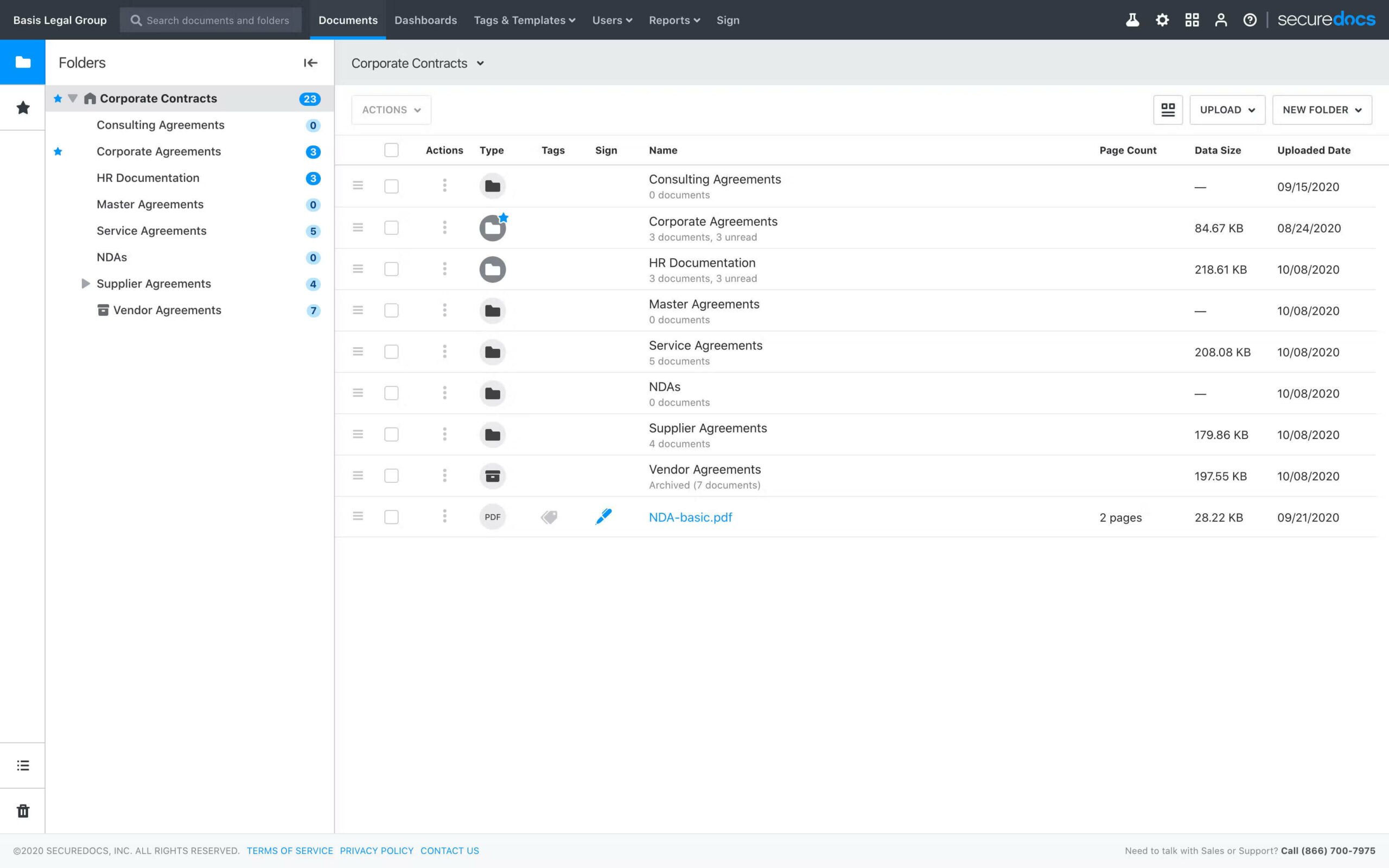
| Custom dashboards | The system displays real-time activity and engagement data across documents and users. |
| One-click privacy blind | Users can instantly hide on-screen information during presentations or shared viewing sessions. |
| New document notifications | Email alerts notify users about newly uploaded documents in folders they have access to. |
User reviews on SecureDocs collaboration tools:
- “It balances powerful security with straightforward collaboration.”
- “Eliminates confusion from multiple file versions and ensures everything stays organized in one secure place, making collaboration with external teams safer and more efficient.”
- “Adding more advanced collaboration or reporting options would improve the overall experience.”
Document management
| Drag-and-drop uploads | DocSend enables quick file uploads by dragging them into the data room. |
| Scanner integration | The platform supports document uploads using Fujitsu ScanSnap scanners. |
| Data room archiver | Users can download a complete copy of the data room after a deal is completed. |
User reviews on SecureDocs document management:
- “It has a great design with drag and drop uploads, and streamlines document management.”
- “For uploading files and saving information, it works well, and the document upload is fast.”
- “Sometimes the interface feels a bit basic compared with more modern tools, which means I spend extra time organizing large folders or navigating nested documents.”
Compliance controls
| Audit logs | The system records all user activity with timestamps for full visibility. |
| Audit trail reporting | Administrators can filter and export activity reports by user and action. |
| Scheduled reporting | Audit logs can be automatically delivered on a daily schedule. |
| NDA enforcement | Users must agree to an NDA before they are granted access to the data room. |
User reviews on SecureDocs compliance controls:
- “The activity tracking feature stands out, providing complete visibility into who accessed files and when.”
- “I really appreciate the strong permission controls and clear activity tracking, as they allow me to stay in control and see exactly what’s happening without needing constant follow-ups and when.”
- “Reporting features could be more advanced, especially for very large data rooms.”
The features and user feedback show that SecureDocs combines strong security capabilities with practical tools for managing and sharing sensitive information in a controlled environment.
Gallery

Deployment, integrations, and support
SecureDocs offers rapid deployment and simplified onboarding. In particular, organizations can launch a virtual data room in ten minutes without technical training and lengthy implementation processes. The platform uses a self-service model to achieve quick operational readiness.
The provider supports several integrations and connected workflow features within the broader Onit ecosystem, including the following:
- SAML 2.0 single sign-on for centralized identity and easy password management
- Fujitsu ScanSnap integration for document scanning and uploads
- Built-in electronic signature for document approvals and execution
- Document templates and NDA workflows for transaction-related processes
For user assistance, SecureDocs provides 24/7 responsive customer support, along with a dedicated help center that includes user guides, training videos, webinars, FAQs, and administrator documentation.
SecureDocs VDR pricing in 2026
The provider uses a flat-fee pricing model with fixed plans designed around project length and usage needs. This structure allows organizations to select a plan based on whether they need short-term access, long-term use, or multi-deal capacity. SecureDocs VDR pricing 2026 includes unlimited users and unlimited document storage.
The plans are as follows:
- $400/month (billed quarterly)
Designed for short-term projects where teams need a secure data room for a limited period. This plan is well-suited to use cases such as divestments, M&A transactions, and bankruptcy-related documentation.
- $250/month (billed annually)
Intended for long-term projects or ongoing use as a repository for the company’s sensitive data. This option suits organizations preparing for continuous deal activity or managing processes that may span more than six months.
- Volume packages (annual billing)
Built for organizations managing multiple concurrent deals. In this plan, SecureDocs pricing is customized based on usage and organizational needs and requires direct contact with the provider.
Learn more about data room pricing to compare plans and choose the option that fits your project needs.
SecureDocs alternatives: When to choose a different VDR
SecureDocs is well-suited for organizations seeking fast setup, ease of use, and straightforward virtual data room management. However, companies with more complex compliance requirements, advanced workflow customization needs, and large-scale enterprise transactions may prefer a VDR with deeper automation and industry-leading security.

Ideals is a deal-focused data room built for controlled sharing, with fine-grained permissions, strong watermarking, and clear reporting that helps teams stay on top of bidder activity.
Start 7-day free trial
DataSite is often used on complex M&A processes, combining robust due diligence tools with structured project management features that help advisors run large, multi-party transactions efficiently.
View DataSite reviewPros and cons of SecureDocs Data Room
The following pros and cons are based on aggregated G2 user reviews of SecureDocs virtual data room.
Pros
- Robust security features
- Easy setup
- Easy navigation
- Simple file uploading
Cons
- Outdated UI design
- Limited file management flexibility
- Limited customization options
- Feature limitations in advanced search and document management
- Limited reporting capabilities
FAQs
SecureDocs comes with an affordable and transparent pricing structure, which starts at $250/month for an annual subscription and $400 for a quarterly-based subscription.
Yes, the platform offers a 14-day free trial with all essential features, allowing users to test the data room before making the final decision.
Yes, SecureDocs offers unlimited users and unlimited data storage under every pricing plan. Hence, it’s a great choice for organizations seeking an affordable data room provider handling large volumes of data.
SecureDocs is SOC 2 Type 2 compliant and is also hosted on ISO-27001 certified data centers.
Yes, SecureDocs supports single-sign-on and multi-factor authentication, strengthening identity security. Moreover, granular permission control measures ensure that only authorized users have access to data, deterring cyber threats and data leaks.
Services
| Automatic Numerical Indexing of Files & Folders | no |
| Drag & Drop Upload of Multiple Files and Folders | yes |
| Desktop Synchronization | no |
| Archives Upload & Extraction | no |
| Document Version Control | no |
| Multilingual Documents Index | no |
| Granular Document Permissions | yes |
| View-Only Access | yes |
| Prevention of Download, Print and Copy | no |
| Remote Shredding of Documents | no |
| Customizable Document Watermarks | yes |
| Secure Fence View | no |
| Document Access Expiry | yes |
| 256-Bit SSL/TLS Encryption | yes |
| Data at Rest Encryption | yes |
| 99.9% Uptime Guarantee | no |
| ISO 27001 Certified | no |
| SOC 2 Certified | yes |
| SSAE 16 Certified | no |
| Data Backup | yes |
| Virus Scanning | no |
| Two-Factor Authentications | yes |
| Mobile Device Management | yes |
| Granular User Permissions | yes |
| Permission Groups | yes |
| Access Expiration | yes |
| Access Limitation by IP Address | no |
| No Plugins | no |
| Scroll-Through Web-Based Document Viewer | no |
| Web-Based Excel Spreadsheets Viewer | yes |
| iOS Application | yes |
| Android Application | yes |
| Mobile Device Interface | yes |
| Search by Name | yes |
| Search by Content (Full Text Search) | no |
| OCR (Optical Character Recognition) | no |
| Filtering by Parameters | yes |
| Basic Questions & Answers Module | yes |
| Advanced Questions & Answers Module | yes |
| Secure User Messaging | no |
| New Document Email Notifications | yes |
| Files & Folders Notes | no |
| Tracking of All User Activity | yes |
| Real-Time Audit Trail | yes |
| Graphic Reports | no |
| Exporting Reports to Excel | yes |
| Tracking of Document Viewing Time | no |
| Branded User Interface | yes |
| Custom Domain | yes |
| Custom Login Page | yes |
| Custom User Invitation Letter | no |
| Custom Agreements for Accessing Data Room | no |
| Active Directory Integration | no |
| Single Sign-On Integration | yes |
| Customer-Managed Encryption Keys | yes |
| Integrations Through APIs | yes |
| Custom Workflows and Features | yes |
| Business Hours Support | yes |
| 24/7 Phone & Email Support | yes |
| Online Help Center | yes |
| Live Training | no |
| Dedicated Project Manager | no |
| Data Room Archive on DVD or USB Drive | no |
| Translation Services | no |
| Cloud (Web-Based) | yes |
| On-Premise (Installed) | yes |
| Multiple Datacenter Locations | yes |
| Free Demo | yes |
| Free Trial | 7 Days |
| Price | All price categories |
| Established | 2012 |
| Headquarters | San Francisco, California |


