Ideals Data Room: Provider Overview

About Ideals
When choosing a secure platform for something as sensitive as an M&A deal, a fundraising round, or even a real estate transaction, Canadian teams need a virtual data room (VDR) that keeps information safe and is simple to use day-to-day. Bonus if the pricing tiers are transparent and there are no hidden fees. According to multiple reviews on G2 and Capterra, Ideals virtual data room software caters to those needs.
Ideals has been around since 2008 and has supported thousands of deals. It’s a platform many people turn to when they need organized workflows for due diligence, investor access, and working with multiple parties at once.
In this guide, we’ll walk through how Ideals handles document-heavy projects, what actually sets its features apart from other platforms, and where it makes the most sense (or doesn’t) for Canadian companies in different industries. The goal is to help you see clearly whether it’s the right fit for your next deal.
What is the Ideals virtual data room, and who is it built for?
An Ideals virtual data room is a cloud-based repository where deal teams upload, organize, and share sensitive documents with external parties under controlled conditions. Unlike generic file storage, a virtual data room enforces access policies at the document level, logs every interaction, and restricts actions like printing, forwarding, or screenshots.
This virtual data room space is built for organizations that need to:
- Control who sees which files and when
- Track buyer or investor engagement
- Satisfy regulatory audit requirements
- Collaborate securely across jurisdictions
Ideals serves small advisory boutiques, mid-market corporations, and enterprise-level financial institutions. The platform scales from single-project use to unlimited transactions under higher-tier plans.
Industries using Ideals VDR
Ideals is a virtual data room solution of choice across the following industries:
- Financial services and investment banking
- Healthcare and life sciences licensing
- Real estate development and property sales
- Government procurement and public-private partnerships
- Education sector partnerships and research collaboration
Ideals VDR key features, best-fit use cases, support
Ideals is a secure collaboration platform developed by Ideals Solutions. It is headquartered in London with offices in New York, Hong Kong, Dubai, and eight other global locations. Its core strengths include:
- Strong, enterprise-grade security and compliance
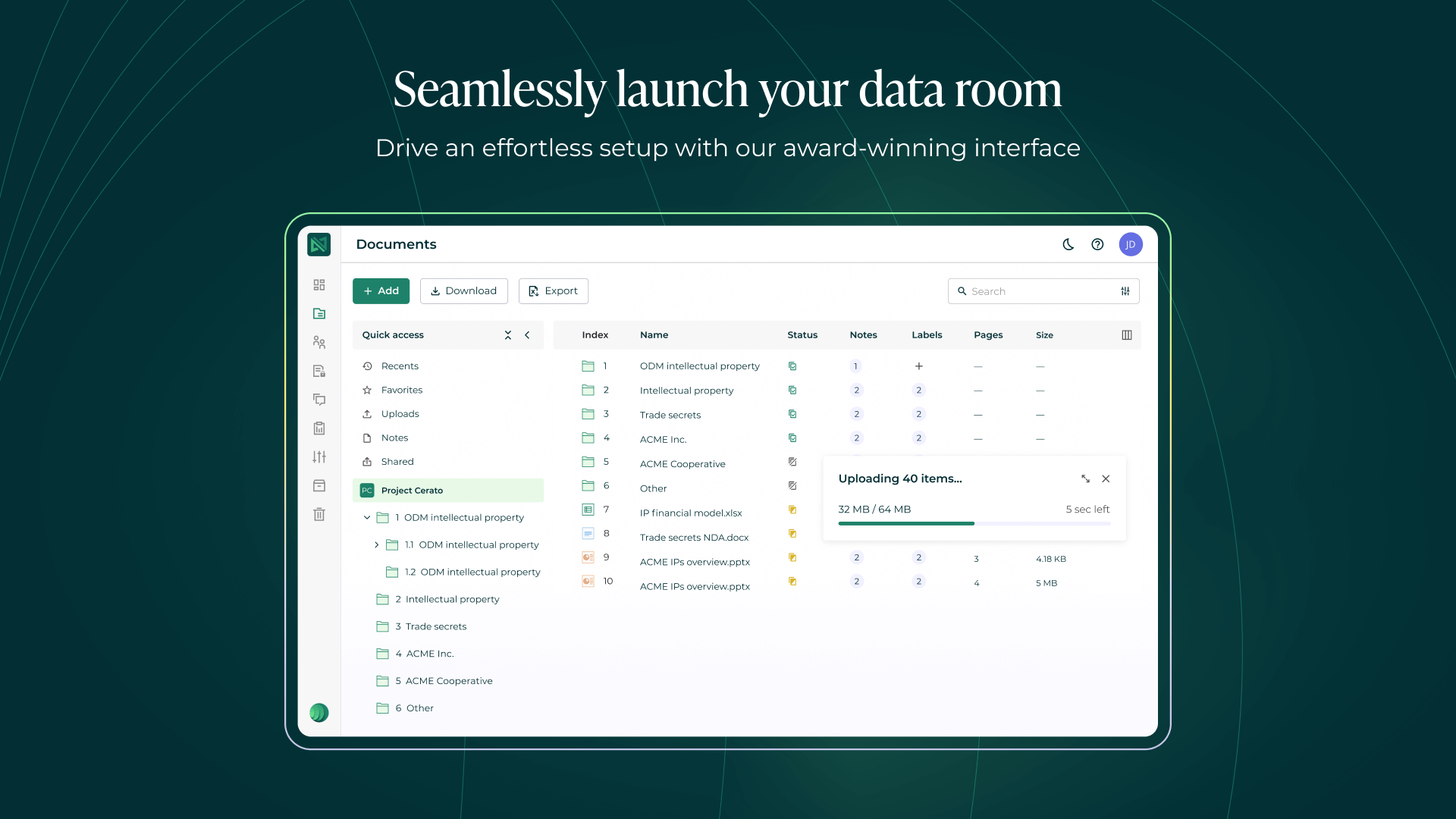
- Excellent user experience with easy onboarding and an intuitive, user-friendly interface
- Efficient document management, organization, and retrieval
- Granular access control & detailed audit trails
- Reliable global infrastructure & performance
All these strengths make Ideals data room a reliable choice for secure document sharing during:
- M&A buy-side and sell-side due diligence
- Real estate syndications and joint ventures
- Private equity fundraising and LP reporting
- Legal and compliance audits
In addition to enhanced security features and collaboration functionalities, Ideals support team is often praised for their accountability and responsiveness. They provide:
- 24/7/365 via live chat, phone, and email
- 60-second chat, 30-minute email response in Pro tier
- 30-second chat, 15-minute email response in Business tier
- Dedicated project manager in the Enterprise tier
Customer support is offered in over ten languages. Users highlight the impeccable customer service with single-point-of-contact resolution and minimal escalation delays.
Ideals data room solution use cases in Canada
Canadian teams deploy Ideals dataroom across four primary use cases:
1. M&A transactions
Buyers and sellers upload the financials, contracts, IP documentation, HR records and other documents into Ideals M&A virtual data room. The data room structures the index to mirror standard due diligence checklists, reducing back-and-forth requests.
2. Real estate syndications and asset sales
In a real estate data room, developers can share property appraisals, zoning permits, lease agreements, and environmental assessments with potential investors or buyers.
3. Fundraising and LP reporting
Private equity and venture capital firms use Ideals VDR to share pitch decks, portfolio performance reports, and fund documents with limited partners.
4. Legal and security compliance audits
In a virtual data room, law firms and corporate legal departments centralize contracts, regulatory filings, and internal policies for third-party review.
Gallery
How Virtual Data Room Ideals supports Due Diligence workflows
Due diligence is the process of verifying financial, legal, and operational status of a target company before finalizing a transaction. Ideals due diligence data room solution structures this process into measurable phases. Here is how it commonly looks like:
- Data room setup (Week 1)
Seller’s team:
➜Uploads documents in bulk, maintaining the existing folder hierarchy.➜Applies automatic indexing and numbering.➜Sets default permissions (read-only for all buyers).➜Enables dynamic watermarking with recipient name and timestamp. - Buyer access and initial review (Weeks 2–4)
Buyer’s team:
➜Logs in via secure link with two-factor authentication.➜Reviews executive summary and financial highlights.➜Submits preliminary questions through the Q&A module.➜Flags documents for later reference.
Admin monitoring:➜Tracks which buyers opened which files.➜Identifies overlooked categories (e.g., no one reviewed environmental reports).➜Sends automated reminders for unanswered questions. - Deep-dive analysis (Weeks 5–8)
Buyer’s team:
➜Downloads permitted files with embedded watermarks.➜Requests additional documents via Q&A.➜Collaborates internally using document annotations.
Seller’s team:➜Uploads requested files within hours.➜Uses the impersonation feature to verify buyer permissions before granting access.➜Generates weekly activity reports for internal stakeholders. - Final confirmations and close (Weeks 9–10)
Both parties:
➜Reference audit logs to confirm all disclosed materials were reviewed.➜Archive data room content for post-close compliance.➜Maintain read-only access for 12 months (Enterprise tier).
Ideals VDR features that matter in practice
While marketing materials list dozens of features, Canadian buyers should evaluate these six capabilities of Ideals virtual data room:
| Feature category | Key capabilities |
|---|---|
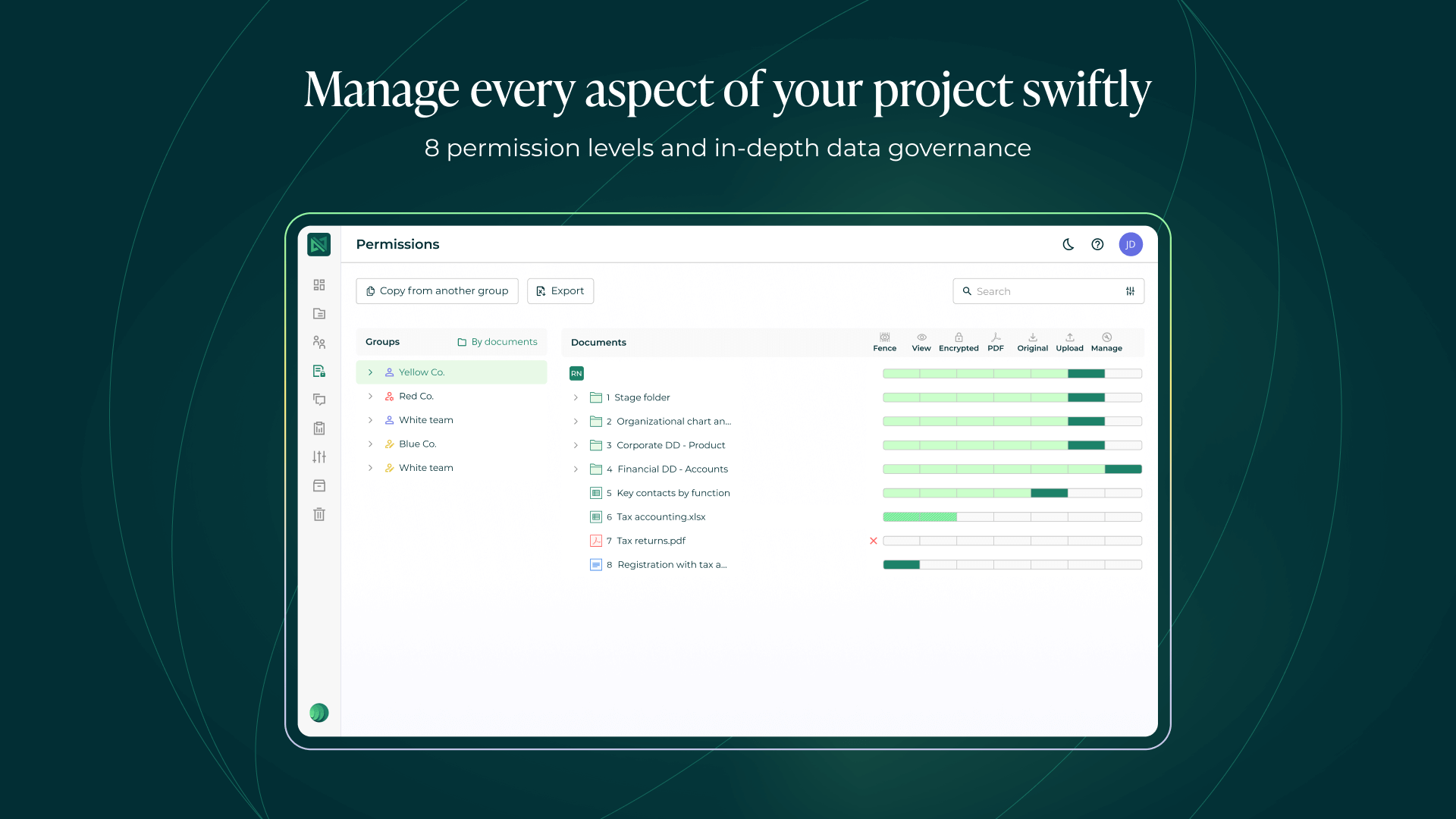
| 1. Granular access permissions (Eight access levels) |
|
| 2. Q&A workflow with assignment & centralized question management |
|
| 3. Real-time reporting & Analytics engagement dashboards |
|
| 4. Built-in redaction tool for secure document editing |
|
| 5. Document versioning & Expiry control & Compliance |
|
| 6. Impersonation feature admin oversight |
|
Compliance & Security measures
When handling M&A deals, due diligence, or sharing confidential documents, companies trust a VDR with their most critical documents. One security gap could mean leaked financials, stolen personally identifiable information, regulatory fines, or a blown deal. In the Canadian context, PIPEDA violations can cost up to $100,000 CAD per violation.
To help their clients avoid those fines and protect the sensitive data, Ideals virtual data room provides the following security features:
| Category | Key features & Certifications |
|---|---|
| Certifications & Standards independently audited |
|
| Encryption & Data protection data security at core |
|
| Authentication & Access controls defending the perimeter |
|
| Redundancy & Uptime business continuity |
|
Data hosting, privacy, and dataroom controls in Ideals
Ideals operates privately owned data centers in nine regions worldwide. When considering Ideals VDR, Canadian businesses should ask:
1. Where is data physically stored?
Ideals does not publicly specify which data center serves Canadian clients. Options typically include U.S.-based facilities (subject to CLOUD Act) or European locations (GDPR-compliant).
2. Who can access the data room content?
Ideals staff cannot view customer data unless explicitly granted access for troubleshooting. Enterprise clients can enable customer-managed encryption, ensuring only the client holds decryption keys.
3. What happens to data after the project ends?
Ideals follows a standard practice: your data remains accessible for 30 days post-subscription unless you request deletion or extended archival.
4. Can we export all data and audit logs?
Ideals allows bulk download of files and audit trail exports (CSV or PDF format).
Ideals pricing: plans, cost drivers, and budgeting tips
Ideals pricing follows a monthly subscription model with three tiers. Data room costs depend on user count, storage needs, and feature requirements.
| Plan | What you get | Best for |
|---|---|---|
| Core | • 1 project • 1 admin • Unlimited users • 0.5–2 GB storage • Standard 24/7 support | Small to medium deals; simple workflows |
| Premier | • 1 project + Premier services • Unlimited admins/users • Up to ~250 GB storage • Faster 24/7 support + training | Complex or high-stakes transactions |
| Enterprise | • Unlimited projects/admins/users • Up to ~1 TB storage • Dedicated 24/7 expert support | Large organizations with ongoing deal pipelines |
The main cost drivers are:
- Storage volume
- User count (Pro tier restricts admins to five. Business and Enterprise are unlimited)
- Feature requirements (SSO and custom encryption require the Enterprise tier)
- Project duration
Using Ideals day-to-day: onboarding, usability, and admin experience
A VDR is only valuable if people actually use it. The fanciest features like granular document permissions, optical character recognition, or remote shred don’t matter if your team is emailing documents instead because the system is too hard to use, and the customer support team is taking forever to answer.
Let’s talk about what daily life with Ideals actually looks like.
Onboarding process (Pro and Business tiers)
- Week 1: a training session covering navigation, permissions, and Q&A setup.
- Ongoing: Email and chat support for configuration questions.
Onboarding process (Enterprise tier)
- Week 1: Dedicated project manager conducts multi-session training for admins.
- Weeks 2–4: Custom workflows configured (SSO integration, automated watermarking rules).
- Ongoing: Direct contact with the project manager for escalations.
Daily usability
Admin tasks:
- Upload files via drag-and-drop or bulk import from network drives.
- Set permissions at the folder or document level.
- Generate activity reports (daily, weekly, or on demand).
- Respond to Q&A questions with attached files.
Guest user experience:
- Receive email invitation with secure link.
- Log in with two-factor authentication.
- Navigate folder tree (similar to Windows Explorer or macOS Finder).
- Submit questions directly from document view.
- Download permitted files with watermarks applied.
Mobile app functionality:
Ideals VDR offers iOS and Android apps with:
- Full document viewing (including PDF annotations).
- Q&A submission and response tracking.
- Activity notifications.
However, keep in mind that mobile apps do not support bulk uploads. Admins must use a desktop for setup.
Pros and cons of the Ideals data room
Here’s a quick look at what buyers usually like about Ideals and where it can fall short in corporate deal management. These points come straight from real user feedback on G2 and Capterra, so you get a clear picture before committing.
Pros
- Very easy to use and fast to set up
- Strong security tools and document access controls
- Ideals customer support team is available 24/7
- Smooth document handling and intuitive interface
Cons
- Data room costs can feel pricey for smaller or short projects
- Some advanced settings can feel overwhelming at first
- Limited customization or integrations in basic plans
Alternatives to the Ideals data room solution in Canada
Canadian buyers should compare Ideals against these providers:
When to consider alternatives:
If the budget is constrained:
- Ansarada offers flat-rate pricing for small deals.
- ShareVault has a per-page pricing that may be cheaper for document-light transactions.
If integrations are required:
- Intralinks offers API access for CRM and workflow tools.
- Merrill DataSite has Salesforce integration for deal pipeline tracking.
If unlimited storage is needed:
- Firmex provides flat-rate plans with no storage caps.
- SecureDocs delivers unlimited storage for all tiers.
All those alternatives are a solid choice. However, in certain situations, Ideals virtual data room still remains the best option. Choose Ideals for:
- Enterprise compliance needs.
- High-touch support that includes dedicated project managers.
- Advanced granular permissions (eight access levels vs. three to five in most competitors).
Final recommendation: Should you choose Ideals VDR?
Ideals data room delivers bank-grade security, responsive support, granular access controls, and much more features suited for high-stakes transactions. Canadian buyers in M&A, real estate, and fundraising deals will also benefit from its audit capabilities and Q&A workflow.
Choose Ideals if:
- The deal involves regulatory scrutiny
- High-level permission granularity is required
- Support responsiveness matters
- You manage multiple concurrent projects (Business or Enterprise tier)
You might want to consider alternatives if the budget is constrained or you need unlimited data storage (Ideals provides up to 1 TB of data storage in its Enterprise tier).
FAQs: Ideals VDR questions buyers ask most often
Ideals is a secure virtual data room used to manage sensitive documents for M&A due diligence, fundraising, real estate transactions, and legal audits. It controls who accesses files, tracks every interaction, and prevents unauthorized sharing.
Ideals pricing is quote-based, varying by storage, users, and features. Pro tier supports one project and 10 GB. Business and Enterprise offer unlimited projects and higher storage. Costs are negotiable, so make sure to request a custom quote.
Yes. Ideals VDR holds ISO 27001, SOC 2, and GDPR certifications. It uses AES 256-bit encryption, two-factor authentication, and audit trails. Verify data hosting location (Canada vs. U.S.) to confirm compliance with provincial privacy laws.
Yes. Ideals provides a free trial with full feature access. Use this period to upload test documents, train teams, and use all the required features to see if they match your expectations.
Yes, for mobile device management, Ideals offers iOS and Android apps for document viewing, Q&A submission, and activity tracking. Bulk uploads and admin tasks, however, require desktop access.
Ideals includes a built-in redaction tool that blacks out confidential text. Admins can redact manually or use keyword search to auto-redact multiple instances. Redactions are permanent unless the admin toggles visibility.
Yes. Business and Enterprise plans allow IP-based restrictions that limit access to specific office locations or VPN addresses. This feature prevents unauthorized logins from unknown locations.
Pro plan supports one project, 5 admins, and 10 GB storage. Business offers unlimited projects, unlimited users, and 250 GB storage, plus file labeling and IP restrictions. Business suits serial dealmakers. Pro fits single transactions.
Setup takes 1–3 days for Pro and Business tiers (upload files, configure user permissions, train users). Enterprise tier setup spans 2–4 weeks due to SSO integration and custom workflows.
Services
| Bankruptcy | yes |
| Biotech Licensing | yes |
| Board Portals | yes |
| Clinical Studies | yes |
| Debt Financing | yes |
| Distressed Real Estate | yes |
| Document Repository | yes |
| Due Diligence | yes |
| Fundraising | yes |
| Hedge Funds | yes |
| IPO & Exits | yes |
| Litigation | yes |
| M&A Buy Side | yes |
| M&A Sell Side | yes |
| Post Merger | yes |
| Private Equity | yes |
| Procurement Management | yes |
| Restructuring | yes |
| File Formats Supported: | All MS Office document formats, as well as pdf, txt, pub, rtf, htm, html, mht, jpg, jpeg, jpe, gif, bmp, png, tif, tiff, wmf, and flv |
| Automatic Numerical Indexing of Files & Folders | yes |
| Drag & Drop Upload of Multiple Files and Folders | yes |
| Desktop Synchronization | yes |
| Archives Upload & Extraction | yes |
| Export of Data Room Index to Excel | yes |
| Document Version Control | yes |
| Multilingual Documents Index | yes |
| Granular Document Permissions | yes |
| View-Only Access | yes |
| Prevention of Download, Print and Copy | yes |
| Remote Shredding of Documents | yes |
| Customizable Document Watermarks | yes |
| Secure Fence View | yes |
| Document Access Expiry | yes |
| 256-Bit SSL/TLS Encryption | yes |
| Data at Rest Encryption | yes |
| 99.9% Uptime Guarantee | yes |
| ISO 27001 Certified | yes |
| SOC 2 Certified | yes |
| SSAE 16 Certified | yes |
| Data Backup | yes |
| Virus Scanning | yes |
| Two-Factor Authentications | yes |
| Mobile Device Management | yes |
| Granular User Permissions | yes |
| Permission Groups | yes |
| Access Expiration | yes |
| Access Limitation by IP Address | yes |
| No Plugins | yes |
| Scroll-Through Web-Based Document Viewer | yes |
| Web-Based Excel Spreadsheets Viewer | yes |
| iOS Application | yes |
| Android Application | yes |
| Mobile Device Interface | yes |
| User Interface Languages: | English, Spanish, German, French, Russian, Turkish, Portugese, Chinese and Japanese |
| Search by Name | yes |
| Search by Content (Full Text Search) | yes |
| OCR (Optical Character Recognition) | yes |
| Filtering by Parameters | yes |
| Basic Questions & Answers Module | yes |
| Advanced Questions & Answers Module | yes |
| Secure User Messaging | yes |
| New Document Email Notifications | yes |
| Files & Folders Notes | yes |
| Tracking of All User Activity | yes |
| Real-Time Audit Trail | yes |
| Graphic Reports | yes |
| Exporting Reports to Excel | yes |
| Tracking of Document Viewing Time | yes |
| Scheduled Reports (Sending to Email) | yes |
| Branded User Interface | yes |
| Custom Domain | yes |
| Custom Login Page | yes |
| Custom User Invitation Letter | yes |
| Custom Agreements for Accessing Data Room | yes |
| Active Directory Integration | yes |
| Single Sign-On Integration | yes |
| Customer-Managed Encryption Keys | yes |
| Integrations Through APIs | yes |
| Custom Workflows and Features | yes |
| Business Hours Support | yes |
| 24/7 Email Support | yes |
| 24/7 Phone & Email Support | yes |
| Online Help Center | yes |
| Live Trainings | yes |
| Dedicated Project Manager | yes |
| Data Room Archive on DVD or USB Drive | yes |
| Translation Services | yes |
| Support Languages: | English, Spanish, German, French, Russian, Turkish, Portugese, Chinese and Japanese |
| Cloud (Web-Based) | yes |
| On-Premise (Installed) | yes |
| Multiple Datacenter Locations | yes |
| Free Demo | yes |
| Free Trial: | 30-Day Trial |
| Price: | Starts from $99 per Month |
| Established: | 2008 |
| Locations: | United States, Canada, Brasil, Turkey, UAE, Israel, United Kingdom, Germany, Russia, Cyprus, Ukraine, Hong Kong, Japan, India, China, Singapore |
| Employees: | 200 |
| Clients: | EMAAR, PWC, BARCLAYS CAPITAL, LINKLATERS, BANK OF AMERICA, WELLS FARGO, EY, CITY, SHELL, DELOITTE, ALLEN & OVERY, UBC, KPMG, STARBUCKS, ROTHSCHILD |